
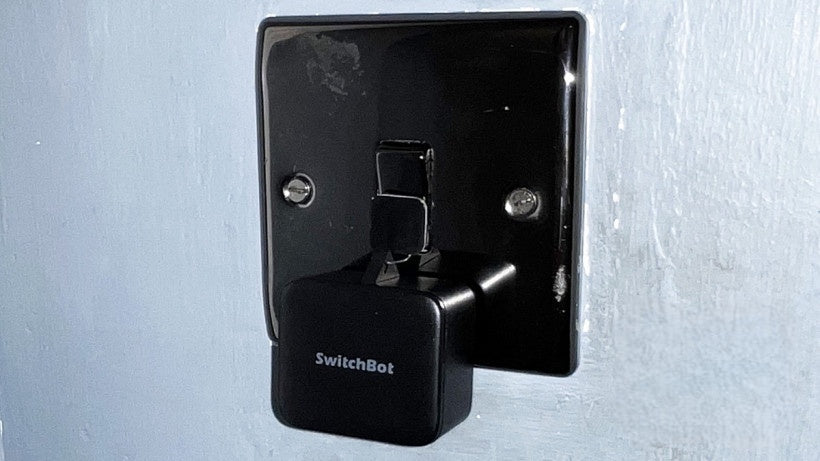
In recent years, smart home technology has evolved from a luxury item into a practical solution for improving daily life. After nearly a year of living independently, I decided to upgrade my home appliances and gadgets with smart devices, focusing on affordability and ease of installation. In this article, I will share my journey of integrating the SwitchBot ecosystem into my home, highlighting the products that have truly transformed my daily experience without breaking the bank.
Why Choose Smart Home Devices?
Smart home products bring convenience, security, and efficiency to your living space. From automated curtains to smart locks, these devices are designed to save time and enhance quality of life. However, much of this technology requires professional installation or expensive lock replacements, which can be a barrier for renters or those hesitant to modify their homes.
SwitchBot's product line offers a compelling solution: simple installation, compatibility with existing setups, and affordability. Here is how I used these smart devices to upgrade my home, step by step.
The Star: Smart Lock Pro
What Makes It Different?
Smart door locks are not new to the market, and many users are already convinced of their convenience. However, many models require replacing the entire lock, which isn't always feasible—especially for tenants or those who prefer to keep their existing locking mechanism.
The SwitchBot Smart Lock Pro stands out because it attaches directly to your existing deadbolt. This means you can enjoy a smart lock experience without needing to replace any hardware. The setup involves two main components:
- Keypad Touch (Front): Allows unlocking via passcode, fingerprint, or RFID card. You can also unlock via the app.
- Smart Lock Mechanism (Back): Physically turns the deadbolt to lock or unlock the door.
Installation and Functionality
Installation took only a few minutes. I used the provided clamps and 3M tape to secure the lock firmly without needing any drilling—though drilling is an option if you prefer extra sturdiness. The keypad offers multiple unlocking methods, catering to everyone in the household, including older family members who might prefer a physical key.
Key Benefits:
- Multiple Unlocking Options: Passcode, fingerprint, RFID card, app control, and traditional keys.
- Instant Notifications: Every locking or unlocking event triggers an alert.
- Security: Data encrypted to bank-grade standards.
- Power: Runs on 4 AA batteries, lasting about 9-10 months.
- Tamper Alarm: An immediate alarm sounds and notifies you if someone tries to remove the keypad.
Personal Impact
Before installing this smart lock, my old deadbolt was quite stubborn, often requiring multiple attempts with the key. Now, I unlock my door smoothly and quickly—it’s like giving my old lock a new lease on life. For renters or anyone unwilling to replace an existing lock, this solution is a game-changer.
Enhanced Control: Smart Hub 2
The Smart Hub 2 serves as the central command center for your smart devices. Priced at HK$530, it connects your SwitchBot products to Wi-Fi, enabling remote and voice control. Key highlights include:
- Voice Assistant Compatibility: Supports Alexa, Google Home, Apple HomeKit, and Matter.
- Remote Access: Control your devices from anywhere, even if your phone's Bluetooth or Wi-Fi is off.
- Temperature and Humidity Monitoring: Built-in Swiss sensors report indoor conditions.
- Infrared Control: Operate IR appliances like TVs, air conditioners, and fans.
Real-World Examples
- Remote AC Control: On hot summer days, I can turn on the air conditioner before I even get home.
- Lost Remote? No Problem: The hub learns your device's IR signals, allowing you to control appliances even without a physical remote.
- Customizable Buttons: Two physical buttons on the hub can be programmed for specific scenes, such as opening or closing the curtains.
For those looking for a more budget-friendly option, the Hub Mini provides core functionality, excluding the temperature sensor and physical buttons.
Automate Your Windows: Curtain Robots
The Curtain 3 Robot automatically opens and closes your curtains via an app or voice command. It is available in three track types, suitable for various curtain rails:
- I-rail
- U-rail
- Rod (Roman rod, like mine)
Installation and Operation
Installation is simple:
- Assemble the robot.
- Attach it to the curtain rings (one on each side for double curtains).
- Apply the magnetic strip to the curtain to help it stay closed.
- Pair each robot individually in the app.
- Calibrate by opening and closing the curtains once.
Once set up, you can control the curtains individually or simultaneously, schedule automatic opening/closing, and even use the Touch & Go feature, where manually pulling the curtain triggers full automation.
Performance and Upgrades
- Speed: Closing a 3-meter curtain takes about 13 seconds—not as fast as manual, but much quieter.
- Strength: Twice the pulling power of the previous generation, capable of handling up to 16kg, perfect for large floor-to-ceiling curtains.
- Noise: Features a Quiet Mode with noise levels as low as 25dB, perfect for early mornings.
- Battery Life: Approximately 8 months per charge, with an optional solar panel for continuous power.
Keeping an Eye on Things: 3K Pan/Tilt Cam
The recently released 3K Pan/Tilt Cam provides comprehensive home monitoring with features tailored for pet owners and general security:
- 360° Horizontal and 115° Vertical Rotation, covering the entire room.
- Two-way Audio: Built-in speaker and microphone for real-time conversation.
- Infrared Night Vision: See clearly in the dark.
- Motion Detection and Tracking: Automatically tracks people or pets (prioritizing humans).
- Privacy Mode: Easily disable the camera when you need privacy.
Storage and Security
- Supports up to 128GB microSD cards.
- Cloud backup available via Amazon AWS with double encryption to protect privacy.
- Affordably priced at HK$460.
Personal Use
I mainly use this camera to keep an eye on my two cats while I'm out. The wide-angle lens captures the entire living room, and the motion tracking ensures I don't miss any important action.
Why the SwitchBot Ecosystem Works
The beauty of the SwitchBot ecosystem lies in its seamless integration and user-friendly app. With just one app, I can control all devices, set up automations, and receive notifications. The setup process is intuitive, and the connection remains stable without random disconnections—a common problem with other smart home products.
Furthermore, the one-year warranty provides extra peace of mind when investing in these devices.
Final Thoughts: The Best Investment?
Of all the products, the Smart Lock Pro has won my heart for its innovation and ease of use. Turning a traditional lock into a smart one in under five minutes was unexpected and incredibly satisfying.
Whether you rent or own, these SwitchBot devices offer a flexible, affordable, and effective way to make your home smart with minimal hassle.
Your Turn: Which Smart Device Will You Choose?
Have you tried any smart home products that changed your daily life? Or are you considering starting with a smart lock, curtain robot, or camera? Feel free to share your thoughts or questions below—I'd be happy to help!
Frequently Asked Questions
Do I need to replace my existing lock to use the SwitchBot Smart Lock Pro?
No. It installs directly onto your existing deadbolt using clamps and 3M tape. There is no drilling required, making it perfect for renters. You can unlock the door using a passcode, fingerprint, RFID card, the app, or even your original key. Four AA batteries last about 9 to 10 months.
Is the Smart Hub 2 mandatory for remote control?
To control your devices remotely while away, or to use voice control via Alexa, Google Home, Apple HomeKit, or Matter, you need the Hub to connect your devices to Wi-Fi. The Hub 2 (HK$530) also includes temperature/humidity sensors and IR control for air conditioners and TVs; for a budget option, consider the Hub Mini.
Are the Curtain 3 robots compatible with my curtain rails?
They come in three versions to support I-rail, U-rail, and Roman rod tracks. They offer enough pulling power for curtains weighing up to 16kg, have a Quiet Mode as low as 25dB, and last about 8 months on a single charge, with optional solar panel support. Available in-stock at LINKO Shop (linko.shop) as authorized Hong Kong imports.
