
The Ultimate Guide to Smart Home Systems: Building a Seamlessly Integrated Brain for Your Home
Have you bought smart bulbs, smart speakers, and robot vacuums, only to find they work in silos, requiring you to open three different apps just to operate them? When you want to set a "Homecoming Mode," you find you can't get the lights, air conditioning, and music to work together? This chaotic "pseudo-smart" experience exists precisely because you lack a powerfulsmart home system to act as a brain for unified command.
A truesmart home shouldn't be a messy collection of numerous smart devices, but an organic whole that can communicate and operate automatically. This core brain is thesmart home system. This article will take you deep into the components of the system, how to choose an ecosystem that suits you, and how to start from scratch to gradually build ahome automation space that anticipates your needs and works seamlessly.
What is a Smart Home System? It’s More Than Just an App + Remote
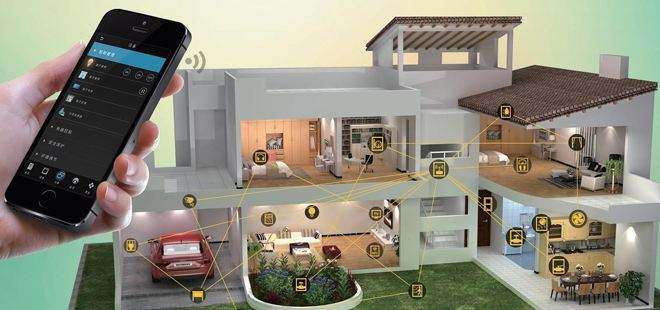
Smart home systems are integration platforms that connect all the individual smart devices in your home through a unified communication protocol and software platform to achieve centralized management andscene automation. Like the conductor of a symphony orchestra, it ensures every instrument (smart device) plays at the right time and in the right way, composing a harmonious symphony of smart living.
A complete system is primarily composed of the following parts:
- Ecosystem Platform: This is the software core of the system, such as Apple HomeKit, Google Home, or Amazon Alexa. They provide a unified app control interface, allowing you to manage devices from different brands.
- Hub/Gateway: This is the hardware brain of the system, responsible for translating and forwarding commands across different communication protocols (such as Zigbee and Z-Wave). Many voice assistants (smart speakers) already have built-in hub functionality.
- Communication Protocols: The "language" through which devices communicate; this determines connection stability, speed, and power consumption.
System Architecture: A Deep Dive into Communication Protocols
Before choosing a system, you must understand the mainstream communication protocols, each of which has its pros and cons.
-
Wi-Fi:
- Pros: Highest penetration, no extra hub required, individual devices can connect directly to the internet.
- Cons: Higher power consumption; when a large number of devices are connected, it can easily overload your home router, leading to latency or disconnections.
- Application: Suitable for devices requiring high bandwidth, such as smart cameras and smart speakers.
-
Bluetooth / Bluetooth Mesh:
- Pros: Low power consumption, and Mesh networking can expand coverage.
- Cons: Short transmission distance, and response speed may be slower.
- Application: Door locks, small sensors, light bulbs.
-
Zigbee:
- Pros: Extremely low power consumption, strong Mesh networking capabilities, high stability, and support for a large number of devices.
- Cons: Requires a dedicated Zigbee gateway/hub.
- Application: Sensors, switches, smart lighting; it is one of the preferred protocols for whole-home smart solutions.
-
Z-Wave:
- Pros: Similar to Zigbee, it offers low power consumption and high stability, and because it uses a different frequency band, it is less susceptible to Wi-Fi interference.
- Cons: Also requires a hub, and the product ecosystem is slightly smaller than that of Zigbee.
- Application: Smart security devices, door locks, curtain controls.
-
Thread & Matter Standards:
- Thread: An IPv6-based low-power mesh networking protocol that combines the stability of Zigbee with the IP connectivity of Wi-Fi.
- Matter Standard: This is the future trend. An application-layer protocol co-launched by giants like Apple, Google, and Amazon, it aims to break down brand barriers. Any Matter-supported device—regardless of whether its underlying layer uses Wi-Fi or Thread—can integrate seamlessly with any Matter-supported ecosystem (HomeKit/Google/Alexa compatible). Choosing Matter-supported products is an investment in the future.
Core Functional Modules: The Foundation of a Smart Home
A comprehensive smart home system usually integrates the following core modules:
- Smart Lighting System: Goes beyond just switching lights on and off; it can adjust color temperature and brightness, set ambient lighting scenes, or link with sensors to have lights turn on when you arrive and off when you leave.
- Smart Security System: Integrates door locks, window sensors, cameras, and alarms. It automatically arms itself when you leave home; if an abnormality is detected, it immediately sends an alert to your phone and triggers an alarm sound.
- Environmental Sensing and Control: Using temperature, humidity, air quality, and light intensity sensors to automatically regulate air conditioners, dehumidifiers, air purifiers, and curtains, maintaining the most comfortable environment in your home.
- Energy and Power Management: Monitor the power consumption of various appliances in your home to identify energy hogs. Use smart scheduling to run high-power appliances during off-peak electricity hours, or even perform dynamic load balancing to prevent power trips.
- Audio-Visual Entertainment System: With a simple "Hey Siri, Movie Mode," the system automatically dims the lights, draws the curtains, and turns on the TV and sound system to create an immersive experience.
How to Evaluate and Choose the System That Best Suits You?
-
Choice of Ecosystem:
- Apple HomeKit: Renowned for security and privacy, high integration, and a clean interface. Suitable for dedicated Apple users.
- Google Home: Powerful AI capabilities, a smart voice assistant, extensive device support, and flexible settings.
- Amazon Alexa: Widest global device support, rich in Skills, and highly versatile.
- Recommendation: Start with the mobile system and voice assistant you use most frequently.
- Device Compatibility and Scalability: Before purchasing any new device, be sure to confirm that it supports your chosen ecosystem and the Matter standard. Only an open, scalable system can meet your future needs.
-
Floor Plan and Network Planning:
- Small Apartments/Renters: Start with Wi-Fi connected devices and one smart speaker.
- Large Homes/Detached Houses: It is recommended to invest in a high-quality Mesh Wi-Fi system to ensure signal coverage and prioritize devices with Zigbee/Thread protocols to establish a stable and reliable whole-home smart network.
- Installation and Maintenance: Some devices (such as smart curtains and recessed lights) require professional installation. Assess your DIY capabilities or include professional installation fees in your budget.
Novice Roadmap: From Single-Room to Whole-Home Automation
-
Step 1: Introductory Experience (Starting with one room)
- Goal: Experience the convenience of voice control and basic automation.
- Devices: 1 smart speaker + 2-3 smart bulbs + 1 smart plug.
- Scene: "Goodnight Mode" - Use voice commands to turn off all room lights and appliances connected to plugs with one click.
-
Step 2: Advanced Integration (Living room and entryway)
- Goal: Establish sensor-based automation.
- Devices: Add motion sensors, door/window sensors, smart TV controllers.
- Scene: "Homecoming Mode" - When the door lock is unlocked or motion is detected in the entryway, automatically turn on entryway and living room lights, play welcoming music, and turn on the air conditioner.
-
Step 3: Expert-Level Whole-Home Smart
- Goal: Achieve intuitive home automation.
- Devices: Introduce whole-home smart panels, various environmental sensors, smart curtains, and energy management systems.
- Scene: "Good Morning Mode" - 10 minutes before the alarm goes off, the curtains slowly open, the lights gradually brighten to simulate sunrise, and the coffee machine starts running. "Leaving Home Mode" - When the system detects that all family members have left the geofence range, it automatically turns off all lights and appliances, activates smart security, and turns off climate control.
Security and Privacy: The Guardians of Your Smart Home
When connecting home data to the internet, security and privacy are the bottom line that cannot be compromised.
- Choose Local-Processing First Systems: Such as HomeKit, where much of the automation is completed locally on the hub, meaning it doesn't need to be uploaded to the cloud, resulting in faster and more secure responses.
- Data Encryption and Account Management: Choose brands that offer end-to-end encryption, and be sure to enable two-factor authentication (2FA) for your system accounts.
- Permission Management: Give family members appropriate control permissions and set up a dedicated "Guest Mode" for visitors, limiting the scope of devices they can control.
Future Trends: Smart Home Systems That Know You Better
- Mainstream Adoption of Matter: Seamless cross-brand integration will become standard, giving consumers greater freedom in choosing devices.
- Edge AI Computing: More AI processing will be performed locally on hubs, allowing systems to predict your behavior patterns faster and more accurately for truly "effortless intelligence."
- Energy and EV Integration: Smart home systems will become the center for home energy management, integrating solar power, energy storage, and EV charging stations for optimized energy scheduling.
- More Intuitive Scene Setup: Automation interfaces will become more graphical and conversational, making it easy for average users to create complex scene automations.
Build Your Smart Home Brain Now
A powerful smart home system is the only way to say goodbye to clutter and move towards a truly smart home. It not only brings convenience but also comprehensively improves your quality of life in terms of security, energy efficiency, and comfort. Start by choosing an ecosystem you trust and expand gradually; you will personally experience the warmth and wisdom that technology brings to your home.
Ready to install a smart brain for your home? Visit Linko.Shop now to explore our carefully curated selection of hubs, sensors, and compatible devices from various brands. Whether you are a beginner or an expert seeking the ultimate experience, you can find the perfect system solution here.
Which smart home system are you currently using? What is your favorite automation recipe? Leave a comment below to share your setup and insights, or ask your questions, and let’s build a more perfect smart home together! You are also welcome to book our online consultation service for a customized expert plan.
Related Reading:
Related Keywords:
Smart Home|Smart Home System|DIY Smart Home|Home System|Door and Window Sensor|Smart Home Device|Smart Product|Smart Home Platform|Smart Home Brand|Smartphone
FAQ
Does a smart home system require a Hub?
It depends on the communication protocol used by the device. Wi-Fi direct devices do not need an additional hub, making them suitable for beginners in small apartments or rental homes. However, low-power devices like Zigbee or Z-Wave require a dedicated gateway as a "hardware brain." Many smart speakers actually have built-in hub functionality.
What is the difference between Zigbee and Wi-Fi devices?
Wi-Fi is widely adopted and doesn't require a hub, but it has higher power consumption and can burden the router as the number of devices increases, potentially leading to latency or disconnection. Zigbee features ultra-low power consumption, self-forming Mesh networks, high stability, and support for a large number of devices, making it one of the preferred protocols for whole-home intelligence—though it does require a dedicated gateway.
Which is better: Apple HomeKit, Google Home, or Amazon Alexa? Where can I buy devices in Hong Kong?
We recommend starting with the mobile ecosystem you use most often: Apple HomeKit is known for security and privacy, Google Home offers strong AI voice control, and Alexa has the widest device support. Prioritize products that support Matter. LINKO Shop (linko.shop) offers in-stock smart hubs, sensors, and smart home devices with official Hong Kong distribution.
