


Shelly 1 Mini Gen4
Couldn't load pickup availability
Purchase and service information
Please book in advance for showroom visits, purchases or collection.
Supply and receipts
Product sourcing and authorised-stock details follow each product page. Ask us about supply and receipts before ordering.
Warranty and support
Warranty duration, provider and coverage depend on the brand and model. Services follow the agreed scope.
Free technical consultation
Free one-to-one smart-home installation advice is available. On-site installation, wiring and setup are quoted separately.
Delivery and appointments
In-stock items, preorders and service appointments have different schedules. Please confirm availability and dates before ordering.


Inventory · Installation
Looking to check inventory or schedule an installation?
Please include the product name and SKU in your inquiry to help us verify stock, lead time, equipment compatibility, and installation arrangements. Please provide your existing equipment model or usage environment so we can offer more accurate recommendations.
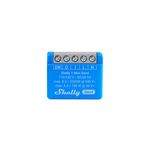
Shelly's next-generation compact smart switch, designed to control lights and small appliances up to 8 A. Equipped with the Shelly chip and support for multi-protocol connectivity: Wi-Fi, Zigbee, Bluetooth, and Matter.

Key Features
- New Feature - Multi-protocol connectivity: Wi-Fi, Zigbee, and Bluetooth options available
- New Product - Matter-certified
- Supports currents up to 8 A at 240 VAC and up to
- 5 A at 30 VDC
- Dry contacts (potential-free) - Contactor control options
- Perfect for retrofitting existing switches and sockets
- Wi-Fi and Zigbee range extender and Bluetooth gateway
- Supports schedules, scenes, and local operation
- Supports scripting, HTTPS, MQTTS, inbound and outbound WebSockets
- No hub required! Easy control via the Shelly Smart Control app, most platforms and protocols, and voice assistants. Use it with Alexa, Home Assistant, or your preferred automation platform.
Use Cases
- Remote Appliance Control: Turn appliances on or off remotely using your smartphone, tablet, PC, or home automation system.
- Network-Connected Convenience: Once the Shelly 1 Mini Gen4 is connected to your Wi-Fi router, you can access and control the device from anywhere with an internet connection.
- Space-Saving Retrofit: Retrofit the smart switch into standard electrical wall boxes, behind power outlets, light switches, or other space-constrained locations.
- Home Automation: The Shelly 1 Mini Gen4 can automatically control appliances, providing a more effortless and enjoyable experience.
Integrations
Features supported by Amazon Alexa
Yes
Features supported by Google Smart Home
Yes
Features supported by Samsung SmartThings
Yes
Simplified internal schematics
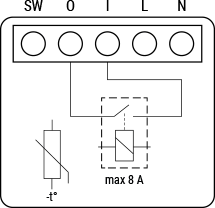
Device electrical interfaces
Inputs
-
1 switch/button input on screw terminal
-
1 potential-free contacts relay input on screw terminal
-
2 power supply inputs on screw terminals: N and L
Outputs
-
1 potential-free contacts relay output on screw terminal
Connectivity
-
Wi-Fi
-
Bluetooth
-
Zigbee
Safety functions
-
Overheating protection
Supported load types
-
Resistive (incandescent bulbs, heating devices)
-
Capacitive (capacitor banks, electronic equipment, motor start capacitors)
-
Inductive (LED light drivers, transformers, fans, refrigerators, air-conditioners))
User interface
Inputs
-
One (Control) button
-
Press and hold for 5 seconds to enable Device access point and Bluetooth connection.
-
Press and hold for 10 seconds to factory reset the Device.
-
Press 5 consecutive times to switch the Device from Matter firmware (default) to Zigbee.
-
Press 3 consecutive times to put the Device in Zigbee inclusion mode. The Device stays in this mode for 2 minutes and you can find it in the Home Automation platform through the Zigbee Hub.
-
Outputs
-
LED (monocolor) indication
-
AP (Access Point) enabled and Wi-Fi disabled:
1 secondON/ 1 secondOFF -
Wi-Fi enabled, but not connected to a Wi-Fi network:
1 secondON/ 3 secondsOFF -
Connected to a Wi-Fi network:
ConstantlyON -
Cloud is enabled, but not connected:
1 secondON/5 secondsOFF -
Connected to Shelly Cloud:
ConstantlyON -
OTA (Over the Air Update):
½ secON/ ½ secondOFF -
Button pressed and held for 5 seconds:
½ secondON/ ½ secondOFF -
Button presses and held for 10 seconds:
¼ secondON/ ¼ secondOFF
-
