


UGREEN 3.5mm Audio Computer Headphone Microphone 2-in-1 Adapter Cable
Couldn't load pickup availability
Purchase and service information
Please book in advance for showroom visits, purchases or collection.
Supply and receipts
Product sourcing and authorised-stock details follow each product page. Ask us about supply and receipts before ordering.
Warranty and support
Warranty duration, provider and coverage depend on the brand and model. Services follow the agreed scope.
Free technical consultation
Free one-to-one smart-home installation advice is available. On-site installation, wiring and setup are quoted separately.
Delivery and appointments
In-stock items, preorders and service appointments have different schedules. Please confirm availability and dates before ordering.
Stock and installation
Check stock or ask about installation
Your WhatsApp enquiry includes this product name and SKU so we can check stock and suitability for your door thickness or HomeKit setup.
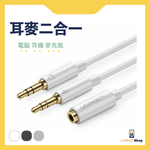
UGREEN 3.5mm Headset Splitter Cable
The UGREEN 3.5mm headset splitter cable allows you to split a single 3.5mm 4-pole headset/microphone plug into two separate 3.5mm plugs for headphone output and microphone input, common on computers. It is suitable for desktop computers, laptops, and online classes/meetings.
Key Features
- Input: 3.5mm 4-position female, suitable for headsets or earphones.
- Output: 3.5mm headphone jack and 3.5mm mic jack for easy connection to PCs/laptops.
- Gold-plated connectors help provide stable sound quality and minimize signal loss.
- Oxygen-free copper conductors for improved conductivity and durability.
- 20cm short cable design, ideal for desktop use without creating cable clutter.
Suitable Scenarios
- Using mobile phone headsets with microphones on desktop computers.
- Online meetings, Zoom, Teams, Discord, online classes, or voice chat in gaming.
- Use when your home or office computer has separate headphone/microphone front audio ports.
Compatibility and Installation Notes
Please ensure your headset has a single 3.5mm 4-pole plug before purchase, and that your computer has separate 3.5mm headphone and microphone jacks. This product is not a USB sound card and will not add microphone functionality to headphones that do not support it.
Specifications
- Brand: UGREEN
- Interface: 3.5mm 4-position female to 2 × 3.5mm 3-position male
- Usage: Headphone/microphone splitter cable
- Length: 20cm
- Optional Designs: Black plastic shell, white plastic shell, silver aluminum shell (subject to page options and inventory)
FAQ
Q: Can I use phone headphones on a computer?
A: If the headphones have a 3.5mm 4-pole plug and your computer has separate headphone and microphone jacks, yes, it can be used.
Q: Are USB headphones supported?
A: No, this product is only compatible with 3.5mm audio interfaces.
Q: What should I do if the microphone has no sound after connection?
A: Please check your computer's input device settings and confirm that your headset actually has microphone functionality.
